
- Published on
Securing My Homelab: Hardening, Monitoring and Why I Bothered
- Authors

- Name
- Ayden Jahola
Table of Contents
Why I bothered
If you've read My Homelab Journey, you know my homelab started as one small PC running Docker Compose. Since then it has grown into a three-node Nomad and Consul cluster running about 40 services: my password manager, analytics, media, documents, a few websites and more.
Security never grew with it. Until this month:
- My router forwarded ports 80 and 443 straight to Traefik, so anyone with my home IP could send traffic directly to my house
- Each app had its own login, and a few had only basic auth
- I had no idea what was hitting my network, what my containers were doing, or whether anything on the hosts had changed
- The whole config lives in a public Git repo
That last point is the one that made me take it seriously. A public repo is great for learning and sharing, but it also means anyone can read exactly what I run, which versions, and how it's wired together. I wanted to be sure that knowing all of that still wouldn't get anyone in.
So I set myself one rule: no single mistake should be enough. If one layer fails, or I misconfigure it, another should catch it. This is called defence in depth, and the rest of this post walks through each layer from the outside in.
| Layer | What I use | The question it answers |
|---|---|---|
| Edge | Cloudflare WAF, Access and Tunnel | Can the internet reach my house at all? |
| Host | nftables, key-only SSH, automatic patches | If it gets past the edge, can it reach anything? |
| Ingress | Traefik, CrowdSec, lan-only middleware | Which services are public, and who is abusing them? |
| Identity | Authentik SSO | Who are you? |
| Containers | Falco, pinned images, nightly CVE scans | What are my apps actually doing? |
| Network | Suricata, AdGuard Home | What is crossing the wire? |
| Hosts | Wazuh | Has anything changed that shouldn't have? |
| Secrets | Consul KV, gitleaks, encrypted backups | What happens if someone reads the repo or a backup? |
Seeing it first
I didn't start by locking things down. I started by looking, because I didn't know what I was defending against.
The first tool I added was Suricata, a network intrusion detection system (IDS). It runs on every node, watches the network interface, and compares traffic against the free ET Open ruleset, which is updated daily.
Within a day it showed me something I'd half known but never seen: bots constantly scanning my domain for router and IoT exploits, with requests for paths like /shell and /device.rsp, or query strings containing chmod. None of it was aimed at me personally. It's just what happens to any IP with open ports.
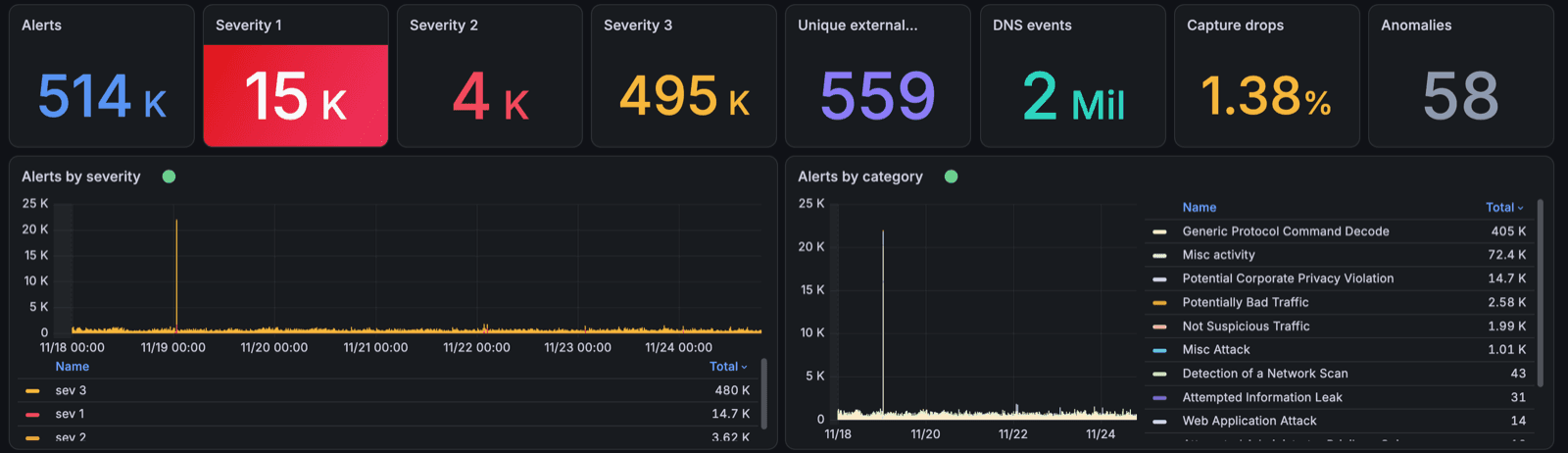
That shaped everything else. The threat to a homelab usually isn't a skilled attacker who wants your data. It's automated scanners looking for anything unpatched or misconfigured. So the goal is simple: be a boring target, and notice quickly if something gets through.
Layer 1: The edge
Cloudflare WAF
My domain already went through Cloudflare, so the cheapest win was its Web Application Firewall. The free plan gives five custom rules, and I use two:
- Block a few countries and Tor. I get nothing but scans from them, and no real visitors.
- Block the exploit paths Suricata kept flagging, so those requests never reach my network.
{
  description = "Block router and IoT exploit scanners"
  expression  = "(http.request.uri.path contains \"/shell\") or (http.request.uri.path contains \"/device.rsp\") or (http.request.uri.query contains \"chmod\")"
  action      = "block"
}
I also set SSL to strict and the minimum TLS version to 1.2.
All of this is managed with OpenTofu (the open-source Terraform fork) in the same repo. Why as code? Because settings clicked in a dashboard are invisible. A year from now I won't remember why a rule exists, but git blame will.
Cloudflare Access
Some of my apps, like Grafana, are useful to reach from outside, but nobody except me should see them. Cloudflare Access puts a login page in front of a hostname at Cloudflare, before the request even reaches my network.
I set Authentik (more on that below) as the only login provider. So a stranger hitting my Grafana URL gets a Cloudflare login page, not my Grafana.
Why both Access and the app's own login? Because apps have bugs. If Grafana ever has an authentication bypass, an attacker would still need to get past Access first.
One catch: Plausible (my analytics) is behind Access too, but its tracking script and event API (/js/* and /api/event) must stay public, or every visitor's browser would hit a login page.
Cloudflare Tunnel: closing the ports
This was the big one. A Cloudflare Tunnel flips the connection around. Instead of the internet connecting in to my house, a small program called cloudflared connects out to Cloudflare and keeps that connection open. Requests come back down it.
Why does that matter? With no port forwards, there's nothing to scan. My home IP no longer appears in DNS, and the WAF and Access rules can't be bypassed by going straight to my IP, because there's nothing listening there.
I run cloudflared on every node, so the tunnel stays up if one node dies. Routing stays in Traefik, not Cloudflare: the tunnel sends everything to a Traefik entrypoint that only listens on 127.0.0.1, and each public service has to opt in:
"traefik.http.routers.vault.entrypoints=https,tunnel",
A service that doesn't list tunnel can't be reached from the internet, even if someone guesses its hostname. Public is something a service opts into, not the default.
Layer 2: The host
A firewall in case I undo the tunnel
What if a port forward comes back? Maybe I add one while debugging at 2am, or the router resets. Each node now has an nftables rule, deployed by Ansible, that drops traffic to ports 80 and 443 unless it comes from the LAN, the VPN or Docker's own networks:
table inet homelab_ingress {
  chain input {
    type filter hook input priority filter - 10; policy accept;

    iifname "lo" accept
    tcp dport { 80, 443 } ip saddr { <lan>, <vpn>, <docker> } accept
    tcp dport { 80, 443 } counter drop
  }
}
Why, if the tunnel already closed the ports? Because the router is a single point of failure that I don't manage as code. This rule means a mistake on the router alone isn't enough.
One gotcha worth knowing: Debian's default nftables.conf starts with flush ruleset, which wipes the rules Docker, Nomad and my VPN depend on. So the default nftables service stays disabled, and my table loads from its own small systemd unit and only ever replaces itself.
SSH and patching
Two boring changes that matter more than anything flashy:
- SSH accepts keys only. Password and keyboard-interactive login are disabled. Why: password guessing is the most common attack on any SSH server, and keys make it pointless.
- unattended-upgrades installs Debian security updates automatically, without rebooting. Why: most real breaches use known bugs that already have a patch. Automating the patching means I don't have to remember.
Kernel updates still need a reboot, so I roll those out by hand, one node at a time, draining each node first so its apps move to the others.
Layer 3: Ingress
lan-only for internal tools
Lots of my services should never be public: the NAS, the Nomad and Traefik dashboards, my DNS admin page. They live on a separate .local subdomain and carry a lan-only middleware in Traefik:
http:
  middlewares:
    lan-only:
      ipAllowList:
        sourceRange:
          - '192.168.1.0/24' # home LAN
          - '172.16.0.0/12' # Docker networks
          - '10.0.0.0/8' # VPN
Why, if the tunnel already ignores them? Same reason as the firewall. If I ever add tunnel to the wrong router by mistake, the middleware still says no.
I deliberately left 127.0.0.1 off that list. All tunnel traffic reaches Traefik from 127.0.0.1, so trusting it would have made every internet visitor look local.
CrowdSec
CrowdSec reads Traefik's access logs, spots attack patterns (vulnerability scanning, brute-forcing logins, known CVE exploits), and bans the offending IP through a plugin in Traefik. It also shares bans with the wider CrowdSec community, so IPs attacking other people get blocked before they reach me.
Why on top of the WAF? The WAF blocks what I know about in advance. CrowdSec reacts to what an IP is doing right now.
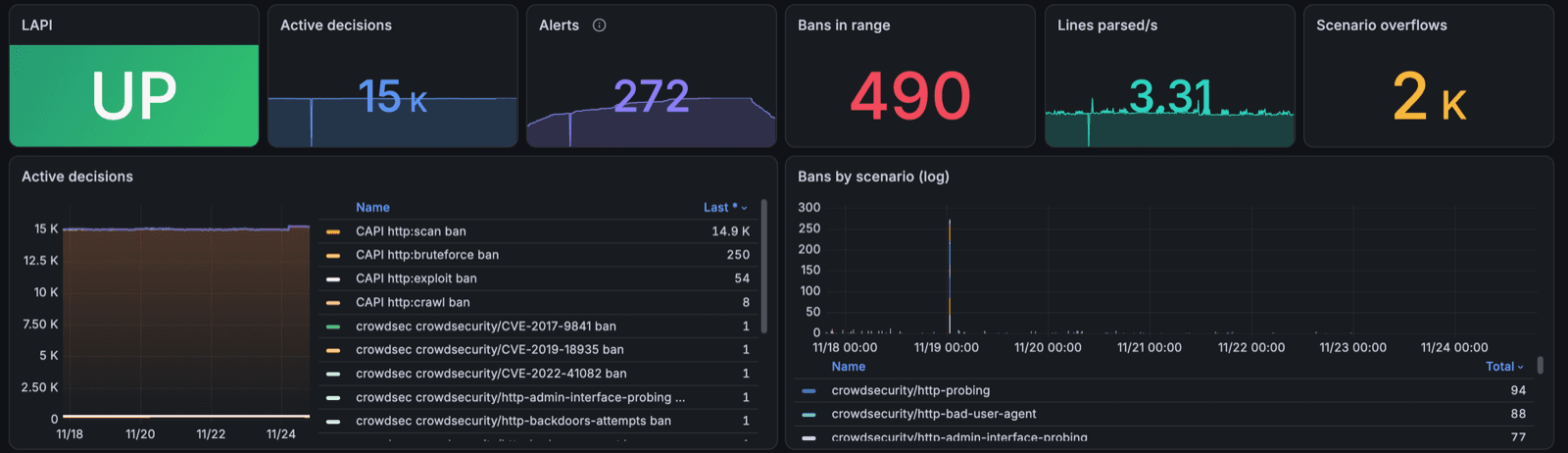
Most of the roughly 15,000 active bans come from the community blocklist. They're IPs caught scanning other people's servers, blocked before they ever reach mine.
Two lessons from running it:
- Your security tool can become your outage. At one point the plugin lost the address of the CrowdSec API while Consul restarted. Its config became invalid, and Traefik dropped every route. Now it reaches CrowdSec through a fixed local address and fails open: if CrowdSec is down, traffic still flows, just without bans. For a homelab, a few minutes without bans is far better than every site going down.
- Get the real client IP right. Behind Cloudflare and a tunnel, every request looks like it comes from Cloudflare or
127.0.0.1. If you don't tell Traefik which proxies to trust for the forwarded headers, CrowdSec ends up banning Cloudflare or nobody at all.
Layer 4: Identity
Before this month, each app had its own users and passwords. Now every app logs in through Authentik, my own single sign-on server.
Why:
- One strong login with 2FA, instead of a dozen weaker ones I'd never rotate
- One place to revoke access. If a device is lost, I end its sessions in one place.
- Apps that had no login at all now have one
Each app's SSO setup is a "blueprint" YAML file in the repo, so adding SSO to a new service means adding one file. Even Wazuh's dashboard and Cloudflare Access use Authentik.
Layer 5: Containers
Falco: what are my apps actually doing?
Falco runs on every node and uses eBPF to watch system calls from every container: shells spawned, sensitive files read, unexpected network connections, privilege changes.
Why: if an app gets compromised, the attacker's first moves (opening a shell, reading /etc/shadow, downloading tools) look nothing like the app's normal behaviour. Falco notices that difference.
The first thing it caught was me. Some of my backup scripts passed secrets to curl on the command line, and Falco logged the full command, secrets included. Anything on a command line is visible to every process that can list processes, and it ends up in logs. Those scripts now read secrets from files in each task's private secrets folder instead.
Pinned images and nightly CVE scans
Every container image is pinned to an exact version, never latest. Why: latest means the code I run can change without me knowing, which is exactly what a supply chain attack relies on.
Pinning has a cost: nothing updates by itself. So I added:
- Diun, which checks for new image versions at 03:00 and sends me one list every Monday
- A nightly CVE scan at 04:00 that runs Trivy against every image in the cluster and sends the results to Dependency-Track, which tracks known vulnerabilities over time
Now I know when something I run has a known vulnerability, and I decide when to update.
Layer 6: The network
Suricata
Suricata (the IDS from earlier) stayed on after showing me the scans. It watches every node's network interface for known attack patterns, including traffic leaving my network. Why outbound too? A compromised device phoning home to a command server is one of the clearest signs that something went wrong.
Out of the box it was very noisy. Lots of rules fire on harmless quirks of normal LAN traffic. I disabled those specific rules, one by one, with a note on each saying why.
AdGuard Home
AdGuard Home is the DNS server for my whole network, running on all three nodes. It blocks ads, but the security value is in the threat lists: known malware domains, phishing sites, badware hosts and dynamic DNS domains often used by malware.
Why DNS? Almost everything bad on a network starts with a DNS lookup. Blocking it there protects every device in the house, including the ones I can't install anything on, like the TV.
It also does split-horizon DNS: inside my house, my domains resolve straight to Traefik instead of going out to Cloudflare and back through the tunnel.
Layer 7: The hosts
Wazuh is a SIEM (security information and event management system). An agent on every node, installed by Ansible, reports to a central server. It does three things I care about:
- File integrity monitoring. It records the state of
/etc,/bin,/sbin,/bootand friends, and alerts if anything changes. Why: an attacker who gets root will almost always modify something there. - Vulnerability detection for the packages installed on each host, not just the containers.
- CIS benchmark checks, which score each host against a standard hardening checklist and tell me what to fix.
Like Suricata, it was noisy at first. Every container health check runs a command inside the container, and Wazuh logged each one every few seconds. One local rule silences those so real events stand out.
Layer 8: Secrets
The repo is public, so secrets can never be in it.
- Every secret lives in Consul's key-value store. Jobs read them at start-up into files with
0600permissions, and fail to start if a key is missing rather than running with a blank password. - gitleaks runs on every commit through pre-commit, along with a check for private keys. Why: I will one day paste a token somewhere by accident. The hook catches it before it's pushed, which matters because once a secret is on a public GitHub repo, you have to assume it's already been scraped.
- Backups are encrypted before they leave the cluster. Database dumps stream straight into
gpgand are uploaded to Google Drive, and the private key only lives on my laptop. Why: a backup is a full copy of your data, often stored somewhere less protected than the original.
Making it all visible
Ten security tools are useless if I never look at them. Everything feeds into one place:
- Logs go to Loki
- Metrics go to Prometheus
- Grafana has a Security folder with an overview dashboard plus one per tool: Falco, Suricata, CrowdSec, Wazuh, AdGuard and the Traefik access logs
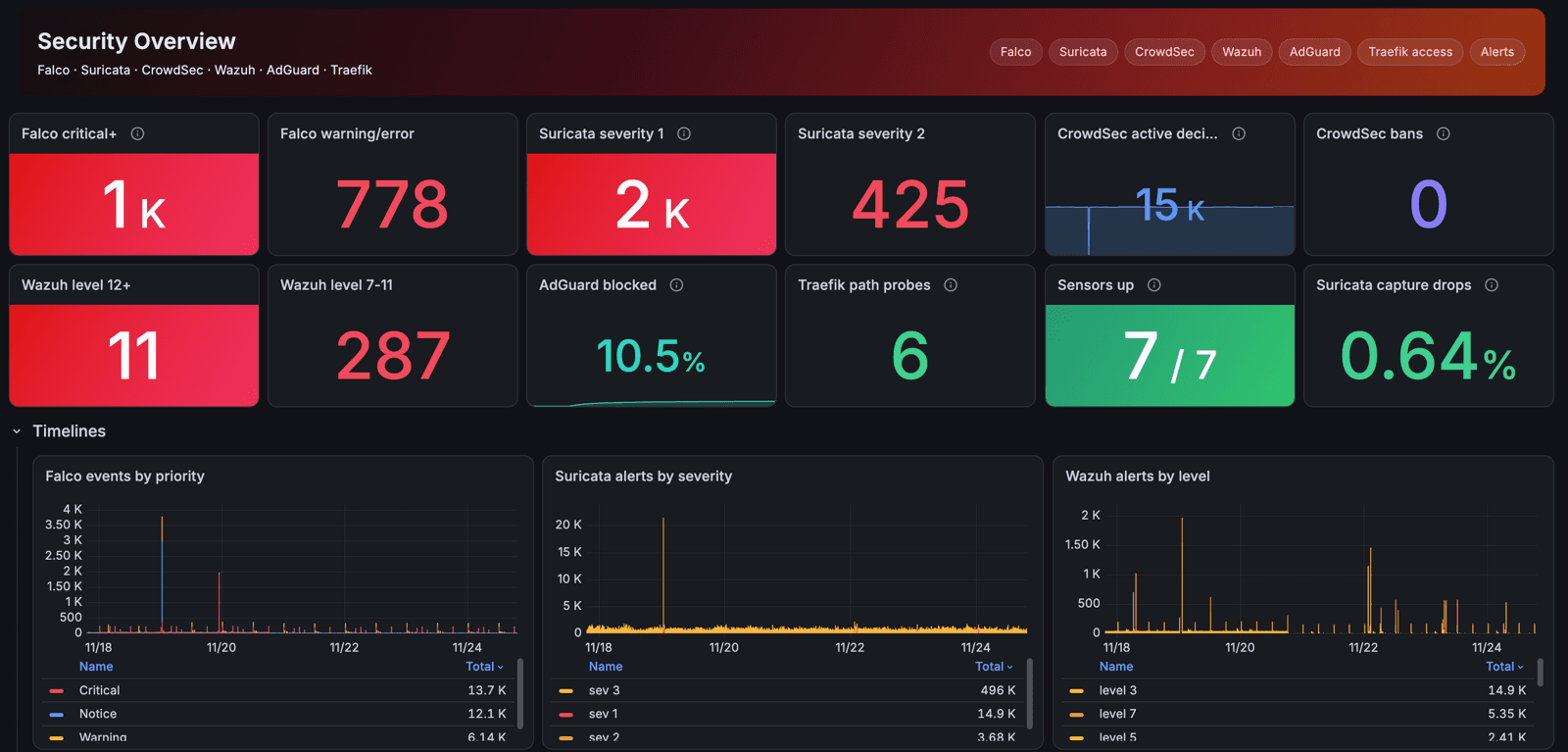
All of the dashboards and alert rules are generated by a Python script in the repo, so they're version controlled like everything else.
Alerts I actually read
Security alerts go to my own ntfy server, which pushes to my phone. My first version pushed everything, and within a day I was ignoring it. That's worse than no alerts at all, because it feels like you're covered.
So now:
- Critical alerts push to my phone: a Falco critical event, a high-severity Suricata alert, a critical Wazuh alert, CrowdSec or the tunnel going down
- Warnings and bursts go to a separate topic my phone doesn't subscribe to. I check it when I sit down.
- Critical security alerts repeat every 12 hours, not every hour, until they're resolved
The test I use: if an alert pushes to my phone, I should have to do something about it. If I don't, it gets downgraded.
What I learned
- Look before you lock. A day of Suricata alerts taught me more about my real threats than any guide.
- Every layer should assume the one before it failed. The firewall exists in case the tunnel is undone.
lan-onlyexists in case I mislabel a router. Access exists in case an app has a login bug. - Security tools can take you down. Anything in the path of every request should fail open, or have a very good reason not to.
- Tune the noise or lose the signal. Every tool here needed rules silenced before its alerts meant anything.
- The boring stuff matters most. Key-only SSH, automatic patches and pinned images do more than any dashboard.
Is it overkill?
For a homelab? Probably. You don't need all of this. If you only do three things, I'd pick:
- Close your ports with a Cloudflare Tunnel (or a VPN, see Setting Up Your Own VPN)
- Put SSO with 2FA in front of everything
- Turn on automatic security updates and key-only SSH
Those three alone make you a very boring target. Everything else is about knowing when something goes wrong, and honestly, building it was half the fun.