
- Published on
Is Your Home Network Secretly a Residential Proxy? I Checked Mine
- Authors

- Name
- Ayden Jahola
Table of Contents
The White House story
This month, researchers at Layer3 Intel reported something odd: residential proxy traffic coming out of the White House network. They counted 236 proxy exits from six White House IP addresses between October 5 and November 3, available through 28 different proxy services (Security Affairs, TechRadar).
Nobody has shown it was a breach. The activity happened mostly in the evenings, which suggests a single person's device, and another research firm, Synthient, linked it to a streaming app that bundles proxy software (Cybernews). Those attributions come from the researchers, not from any official finding.
But it raises an uncomfortable question. If a device on one of the most closely watched networks in the world can quietly become a proxy exit, what about yours?
So I checked mine.
What is a residential proxy?
A residential proxy is a service that lets its customers send their internet traffic out through someone's home connection. To the website on the other end, the request looks like it came from an ordinary household.
That's valuable, because websites trust home IP addresses far more than data centre ones. Customers use residential proxies for things like:
- Scraping websites that block cloud servers
- Checking ads and prices from different countries
- Sneaker and ticket bots
- Fraud, credential stuffing and account takeovers
The question is where all those home connections come from. Mostly, from people who don't know they're providing them.
How a home ends up as a proxy
- Apps with a proxy SDK inside. Proxy companies pay app developers to include their code. The app then uses your connection as a proxy exit, sometimes with consent buried in the terms, sometimes not. A study by Spur found proxy SDKs in 2,058 of 6,038 LG and Samsung smart TV apps it scanned (Help Net Security).
- Cheap Android TV boxes. Many uncertified streaming boxes come with proxy software already installed. This month Google and its partners took down a botnet of about 1.3 million TV boxes being used as residential proxies, with some boxes running three proxy SDKs at once (Krebs on Security).
- "Earn money from your bandwidth" apps. Some apps openly pay you to share your connection. That's at least consensual, but you have no say in who uses it or what for.
Why you should care
- Your IP gets the blame. If someone uses your connection for fraud or attacks, your IP lands on blocklists. You start seeing endless CAPTCHAs, getting blocked by services, or in bad cases, getting a letter from your ISP.
- It's a way into your network. A proxy exit is a device that takes instructions from outside and makes connections on someone else's behalf. Researchers have already seen proxy access abused to reach other devices on the same home network (Maskbreak). That's exactly why the White House story worried people.
- It uses your bandwidth. Usually not much, but it's yours.
How I checked my network
I already run a fair amount of security tooling in my homelab (I wrote it all up in Securing My Homelab), so I had two good places to look: DNS and network intrusion detection.
Check 1: DNS lookups
Almost every proxy SDK has to "phone home" to its company's servers to get instructions, and phoning home starts with a DNS lookup. Every device in my house uses AdGuard Home as its DNS server, and AdGuard keeps a log of every lookup.
I wrote a short script that walks through the query log on all three of my AdGuard servers and looks for domains belonging to known residential proxy and bandwidth-sharing companies. This is the pattern I searched for:
brightdata|bright-sdk|luminati|lum-superproxy|infatica|honeygain|packetstream|
iproyal|pawns.app|earnapp|peer2profit|traffmonetizer|repocket|proxyrack|netnut|
ipidea|922proxy|abcproxy|soax|oxylabs|smartproxy|decodo|proxy-sdk|joinmassive|
bytelixir|getgrass|packetshare|mysterium|rayobyte|lunaproxy|pyproxy
Result: about 310,000 DNS lookups scanned, zero matches.
That's a good result, but it comes with honest caveats:
- It only covers recent history. AdGuard keeps a limited log, so this covered the last few days, not months.
- The list isn't complete. New proxy companies appear constantly, and some SDKs use domains that don't mention the company name.
- Devices can skip my DNS. Some apps and devices use their own DNS servers or DNS over HTTPS and never ask AdGuard at all.
So "zero matches" means "nothing obvious in the last few days", not "definitely clean".
Check 2: Intrusion detection alerts
Suricata watches the network traffic on each of my servers and flags known patterns. It has an alert category called Potential Corporate Privacy Violation, which is where proxy, P2P and tunnelling traffic tends to show up. That sounded alarming: it fired almost 15,000 times in a week.
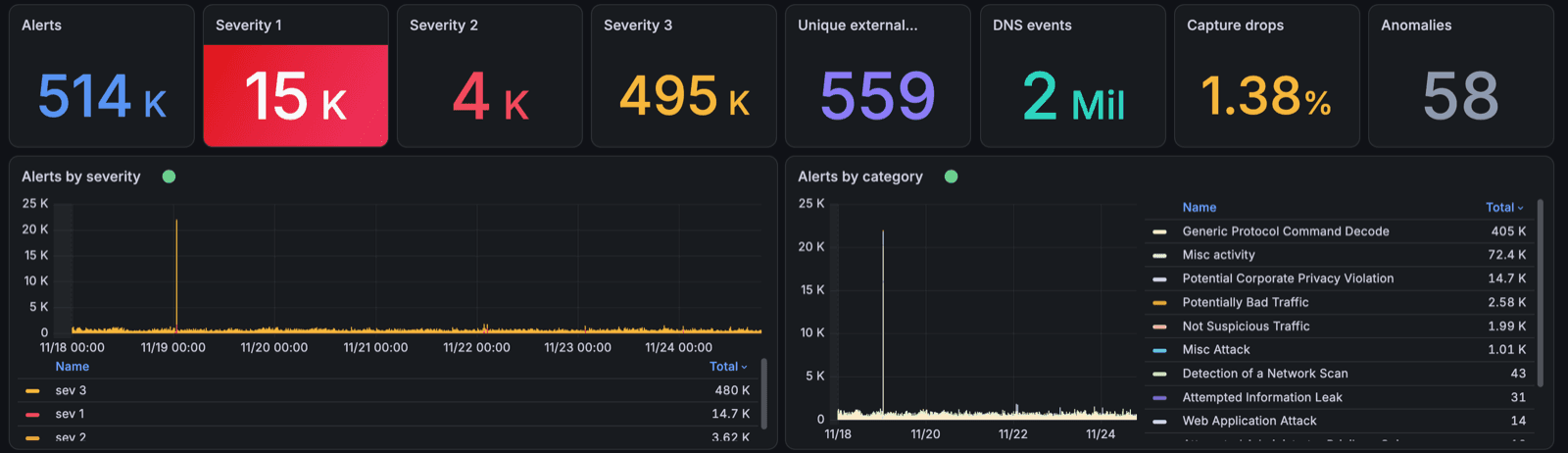
So I broke it down by signature. The whole category came down to two things:
| What Suricata saw | Alerts (7 days) | What it actually was |
|---|---|---|
| Cleartext passwords and basic auth over HTTP | ~8,600 | My own servers talking to each other (see below) |
| BitTorrent and Vuze P2P traffic | ~6,300 | My own torrent client |
Then I searched every alert, in any category, for signatures mentioning proxies, SOCKS, Tor, P2P or tunnels. Besides the torrent traffic, it found Spotify's P2P client (about 1,400 alerts) and my own Cloudflare Tunnel (6). No proxy SDK traffic at all. Everything I found was something I recognised.
What I found instead
The biggest chunk of that category surprised me: about 8,600 alerts in a week for passwords sent in plain text. Things like HTTP basic auth headers and pass= in request bodies, travelling unencrypted.
I traced every one. All of them were my own servers talking to each other:
- Log shipping. My servers send their logs to Loki over plain HTTP. Some log lines happen to contain text like
pwd=andpass=, and Suricata flags those as passwords crossing the network. - My torrent client's API. The apps that manage my media talk to Transmission using a username and password over plain HTTP.
- My notification server. Services post alerts to ntfy with credentials, also over plain HTTP.
None of this crosses the internet. It's all on my home network, between my own machines. But it's still a fair lesson: I'd hardened everything coming in from outside and hadn't thought much about traffic between my own servers. If a device on my network were ever compromised, it could read those credentials straight off the wire.
Encrypting traffic between my own services is now next on my list. Expect a follow-up post once it's done.
That's the thing about looking properly at your own network. You don't always find what you went looking for. Sometimes you find something more useful.
How to check your own network
You don't need my setup to do a basic version of this. In order of effort:
1. Look up your own IP's reputation
Proxy-detection companies keep lists of IPs they've seen acting as residential proxies, and some offer free lookups. Look up your home IP on an IP reputation or proxy-detection service. If it's flagged as a proxy exit and you don't run one, something on your network probably is.
2. Check your DNS logs
If you run Pi-hole or AdGuard Home, search the query log for the company names in the list above. Both let you search the log in their web interface.
If you don't run either, this is a great reason to start. Seeing what every device in your house looks up is eye-opening on its own.
3. Audit the usual suspects
- Cheap Android TV boxes, especially no-name ones that aren't Google-certified. If you have one, the safest option is to stop using it.
- Smart TV apps you installed and forgot about, particularly free streaming and screensaver apps.
- Anything that pays you for your bandwidth. Uninstall it unless you're comfortable with strangers using your connection.
4. Limit what your devices can reach
Put smart TVs, streaming boxes and other IoT devices on a separate network or VLAN, so even a compromised one can't reach your computers and servers. Many home routers can do this with a guest network.
5. Watch your upload
A device that uploads steadily when nobody is using it is worth a closer look. Most routers show traffic per device.
What I learned
- My network came out clean, for now. No proxy SDK lookups and no proxy traffic in a week of alerts. But my checks only cover recent history and known names, so I'll keep watching.
- Scary-sounding alert categories need breaking down. Fifteen thousand "privacy violation" alerts turned out to be torrents and my own servers.
- Look inside the network too. I'd spent a month hardening everything that faces the internet, and the most interesting finding was traffic between my own machines.
If a device in the White House can end up as someone else's proxy exit, any device on a home network can. The good news is that checking takes an evening, and the tools to do it are free.